I am using a Cu board with IO and Alchitry Labs 2.0.42. When i connect the cable into my laptop, the ‘Done’ on the Cu board lights up momentarily and then disappears. Similarly, the ‘Load Flash’ and ‘Erase’ icon on Alchitry labs remain dull and I can’t press them. Any help would be appreciated
The Cu always flashed the DONE LED very briefly at startup. If there isn’t a valid configuration it’ll stay off after.
It sounds like you have a V1 Cu?
Do you see the device in Window’s Device Manager (or lsusb on Linux)?
Have you double checked your USB cable has data lines?
Hmm, I’m not too sure about the Cu - it says ‘built by: sparkfun” on the back. The IO is v2, however.
Also, where would it show up on Window’s device manager? This is all I have so far:
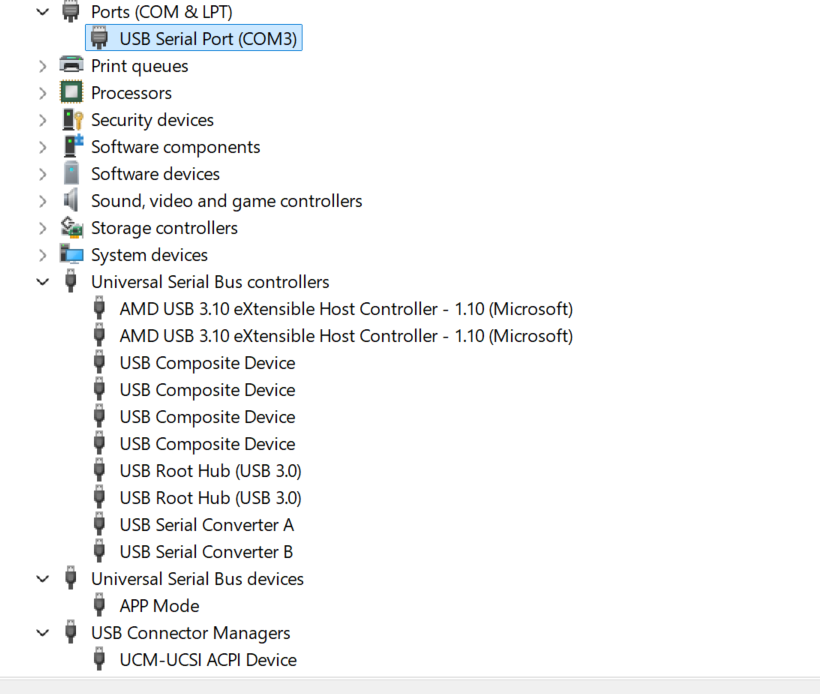
Yes, it is a v1 as it does not say v2. As for usb cable, yes it is the one given in the package
The serial converter A and B are likely the Cu (as well as maybe the COM port).
Make sure you selected Cu V1 (V2 have black connectors and weren’t made by SparkFun) when you create your project in Alchitry Labs otherwise it won’t show the programming button as it’s looking for a different board. You can try switching to the loader (click logo button) to see if it’s detecting any Alchitry boards.
If it doesn’t find anything still, you can try installing the D2XX drivers. D2XX Drivers - FTDI
Usually they’re included with Windows but sometimes it needs to be installed.
I’ve downloaded the drivers. I switched to alchitry loader and it still says it can’t detect any boards. I’ve also made sure the cable has data. Any other troubleshooting methods?
The biggest thing would be to try it on a different computer if you have access to one.
You could also try FTDI’s FT_PROG to read the EEPROM and see if it correctly has “Alchitry Cu” as the description (that’s what Alchitry Labs looks for).
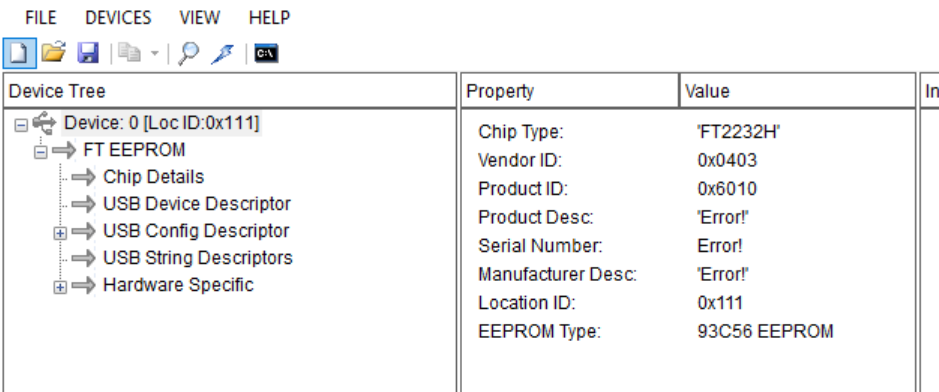
Well that would explain it. I’ve never seen that happen though. See if you can write anything to it. It should say “Alchitry Cu” as the product description and “Alchitry” as the manufacturer description. Serial number is unimportant. I attached the config that should have been programmed. I’m not sure if ft_prog will take this though as we used it with D2XX directly. I can double check next week if you still need help when I’m back at work.
If you can’t write anything, reach out to SparkFun for a replacement. This is either a defective board or it wasn’t initialized correctly. I’m guessing the latter as it detects the EEPROM chip.
EDIT: Attached config file.
ftdi-cu.zip (255 Bytes)
I chagned the product and manufacturer description and it works now! But when I now flash program the device on alchitry labs, i dont see any ‘done’ signal or any of the logic working on the fpga. How should i proceed?
Thanks and happy thanksgiving!
I chose ‘Alchitry Cu’, the ‘blink all LED’ project. Used Yosys. Build > program.
Happy Thanksgiving!
Port A on the FT2232 connects to signals that could keep the FPGA in reset. I’ll have to check if there’s more needed for the configuration to get it to work. I thought that Alchitry Labs did it at runtime but it’s been a minute since I’ve looked at the FTDI config.
I can check Monday. Sorry for the issues with your board. It really looks like SparkFun missed doing the initial program/test on it.
Here’s the example bin that should have shipped on the board. I doubt it’s your problem, but you can try loading it just to fully rule out a build issue.
cu_example.zip (3.4 KB)
Thanks for this! Tried loading it but still nothing.
I don’t have a lot of confidence this is your issue, but here’s the FT_PROG config I saved off one of my Cu V1s. Try loading it to your Cu and program it. If it still doesn’t work, it’s probably worth contacting SparkFun for a replacement.
Are you seeing any errors when trying to program it or does it seem like it works but just does nothing?
cu_v1_ftdi.zip (989 Bytes)